Your hotel, squeaky clean.

Housekeeping and rota software for independent hotels. See which rooms are ready and who’s on shift, on the phones your team already has.

Built inside a working hotel in Malta. Taking our first hotels now.
Today · 2nd floor

Tap a room to move it along

0 To do 0 In progress 0 Clean 0 Inspected
Turnover Departure Refresh
Squeaky clean! Every room inspected.
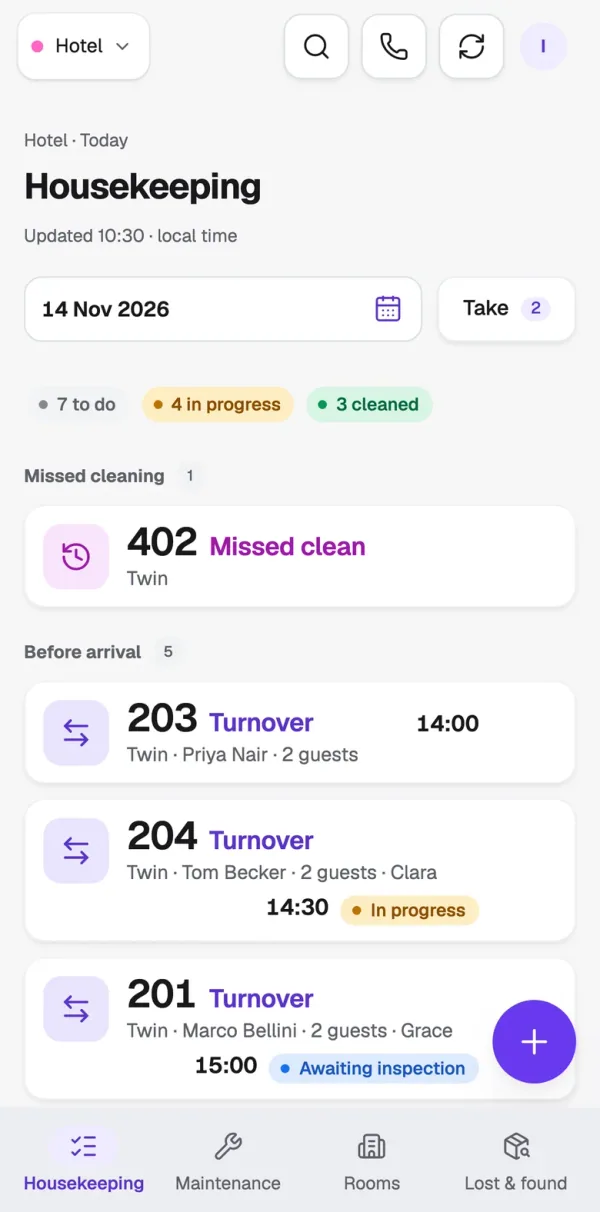
The same board on a housekeeper’s iPhone: 7 to do, 4 in progress, 3 clean, room 402 missed, and the next arrivals in order
Paper sheetsa live board WhatsApp rotasone published week “Is 204 ready?”everyone already knows Sticky notesa fix list with photos Guessed hourson-site clock-ins
Housekeeping

Know which rooms are ready without asking.

Turnovers, departures, stay-over refreshes and arrival checks line up on the board in the order they’re due. Housekeepers claim rooms on their phone and move them along. Supervisors inspect and sign off.

Squeaky · Cleaning board
The Squeaky housekeeping board: today’s cleans grouped into missed, before arrival, departures and refreshes, with who’s on each
Squeaky · Rooms
Rooms by floor, 4 down to 1: who is in each room and whether it is clean, dirty or being cleaned
Squeaky · Task
Room 204’s turnover: Clara cleaning since 10:05, twin beds set, a note about extra hangers, and the steps to Tom’s arrival
Squeaky · Maintenance
Maintenance board: two open, two in progress with Elena Novak, and 208’s leaking shower resolved
Squeaky · Settings
Cleaning rules: refresh every few days with a preview of the refresh days

The real app. Today’s cleans in the order they’re due, with who’s on each.

Housekeepers claim their own rooms

They tap each room along as they go. If a guest turns down a clean or has Do Not Disturb up, they mark it on the room, so it isn’t lost.

Linen counts from the bed set-up

Each room lists the sheets and towels it needs, from its beds and the booking.

Refreshes on the right days

Set the rule once, halfway through the stay or every few days, and Squeaky adds the stay-over cleans.

Who’s on 204?

Clean status, open issues and who’s on it, on the room itself.

On their phones

One tap to start a room.

Each housekeeper sees their rooms, when the guest arrives and one big Start button.
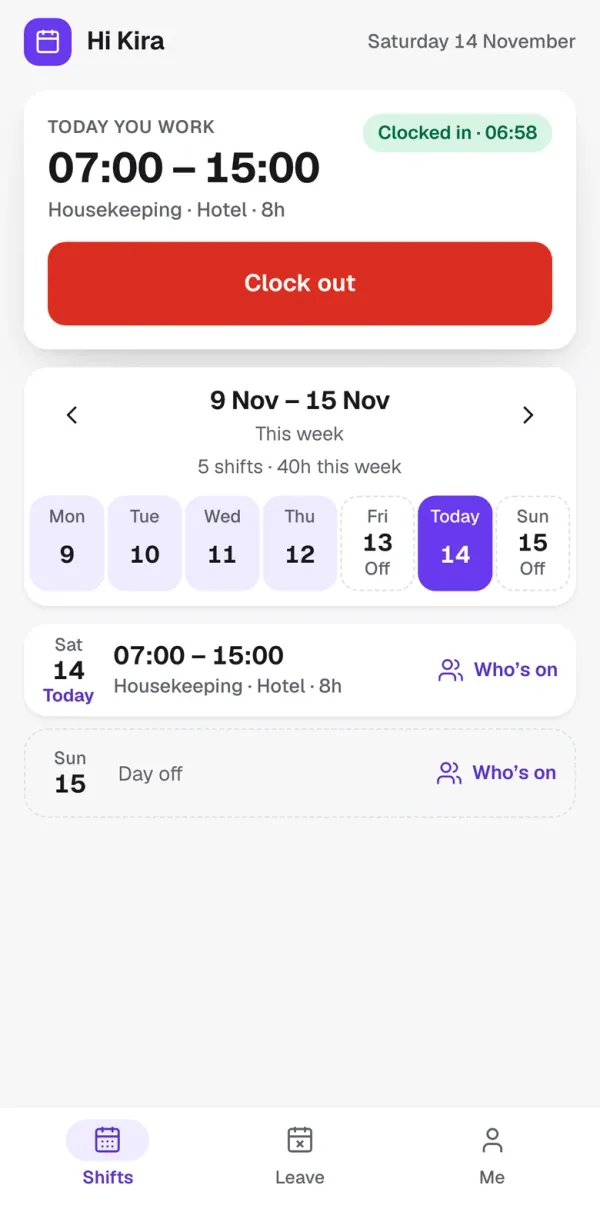
Kira’s shifts on her iPhone: today 07:00 to 15:00, clocked in on site at 06:58, with a Clock out button
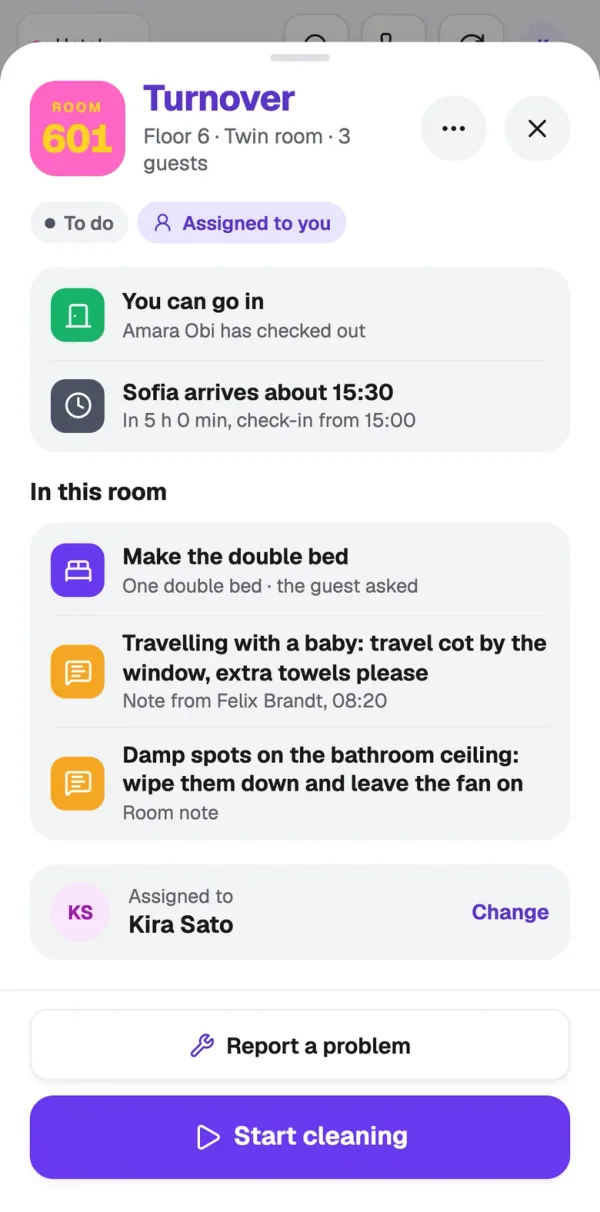
Room 601 on Kira’s iPhone: you can go in, Sofia arrives about 15:30, the bed request and notes, and one big Start cleaning button
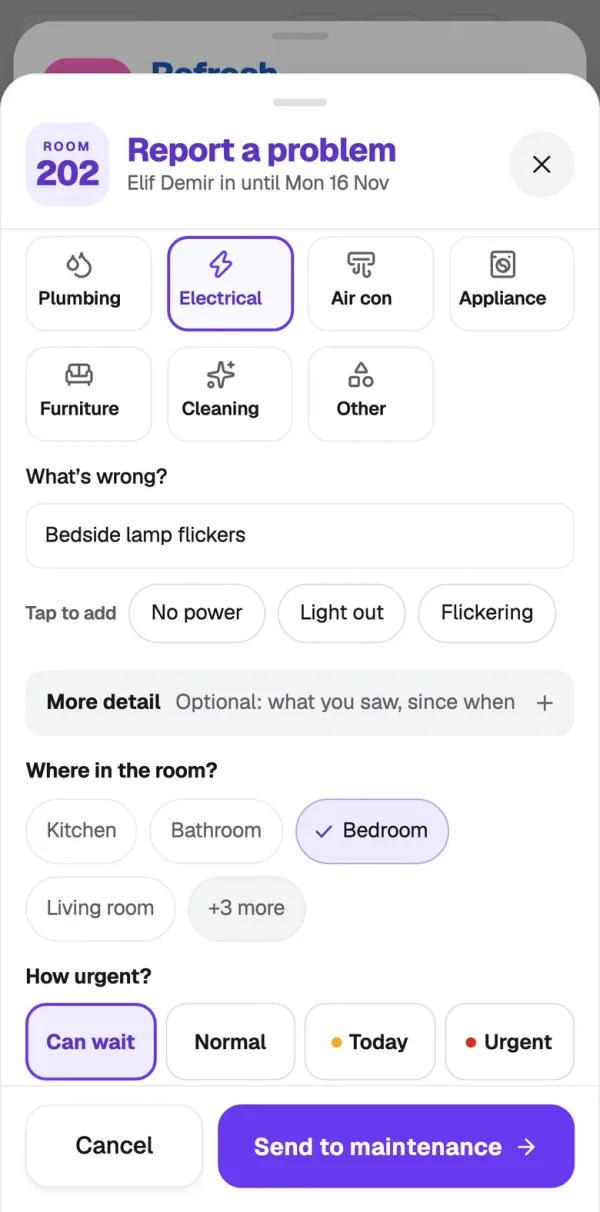
Reporting a flickering bedside lamp in room 202 from an iPhone: Electrical, Bedroom, can wait
Try it

Give room 207 a scrub.

Drag the sponge. When a room is marked Clean, the supervisor and the front desk see it on their board straight away.

207To do

Turnover · Out 10:00 · Due 16:00

Scrub me

Maintenance and lost property

A dripping tap, reported with a photo.

Anyone on your team can report it from their phone in seconds. It lands on the maintenance board, marked by how urgent it is, ready to assign. Lost a charger in 303? It’s logged, kept and handed back, with a trail.

  • Urgent, High or Low on every report
  • Assign it, then see when it’s fixed
  • Lost property logged with a photo

Open 3

HighShower leakingRoom 208 · Elena
HighShower drain is slowRoom 301 · Unassigned
LowWardrobe door hinge looseRoom 204 · Elena

In progress 2

UrgentAir conditioner not coolingRoom 306 · Elena
HighGrab rail looseRoom 102 (accessible) · Elena

Resolved 2

FixedKettle trips the fuseRoom 104
Lost propertyPhone charger handed backRoom 303
Rota

Copy last week. Fix Tuesday. Publish.

Or let Squeaky plan it from each person’s contract. Then publish, and everyone taps “I’ve seen my shifts” on their phone. No more screenshots of spreadsheets.

16–22 Nov

Try it: tap Copy last week, then fix Tuesday.

Swipe for the whole week →

  • Publish with a receipt: see who has seen the week and who hasn’t.
  • Clock-ins that keep themselves honest: on-site, with late reminders and odd punches flagged.
  • Leave requests, out of WhatsApp: asked and approved on the phone.
Squeaky · Leave
Leave requests with the balance left if approved
Squeaky · Timesheets
Last week’s timesheets, all approved except one late clock-in flagged for review
Squeaky · Rota
The published rota week: every shift filled and all 11 staff have seen it

The real app. Leave requests waiting for a yes, with the hours left if approved.

For owners

The whole hotel, without asking for a report.

Arrivals, rooms left to clean, open issues and the shift handover, on one screen. Add a person once, with their role and hotels, and they can use Housekeeping and Rota.

Squeaky · Today
Today at a glance: arrivals, rooms left to clean, open issues and the shift handover notes
  1. 1One login, both appsTheir role decides what they see
  2. 2Today’s roomsHow many are done and how many are left
  3. 3Shift handover notesWritten at the end of one shift, read at the start of the next
Get early access

A note from the founder

I run a hotel in Malta. We built Squeaky because paper sheets, WhatsApp rotas and “is that room ready?” calls were eating our mornings. Now we run every morning on it. We’d like you to try it.
— John FeliceFounder, Squeaky
Pricing

Prices by hotel size.

Tell us who you are and which hotel you run, and the prices open right here.

Open the prices

Name, email and hotel, and the prices open.

We’ll use these details to send you the prices and follow up about Squeaky. Hotel list from the Malta Tourism Authority register and OpenStreetMap. Privacy policy.

FAQ

Questions hotels ask us.

Does it work with my PMS?

Yes. Bookings come in from your PMS automatically, so the board knows who’s arriving, leaving and staying. Tell us which PMS you use when you sign up and we’ll connect it on your setup call.

Who is Squeaky for?

Independent hotels, aparthotels and serviced apartments with a housekeeping team and shift-based staff.

Does my team need new phones?

No. Squeaky runs on the phones they already have.

Do I need both Housekeeping and Rota?

No. Housekeeping and Rota each work on their own. Use both and you add a person once, and they’re in both apps.

Is my data safe?

Your hotel gets its own account. Other hotels can’t see your rooms, staff or notes, and we never sell your data.

How much does it cost?

Prices are in the Pricing section above. Tell us your name, email and hotel and they open straight away.

Which languages is it in?

The staff app is in English today. More languages are on the way.

Something we didn’t cover?

Put your hotel on the board.

We’re taking a small group of hotels first. We set your board up with you on one call, your team signs in on their phones, and that’s the training.We set your board up with you on one call. Your team signs in on their phones.

Rather talk?

Book a 15-minute call

Fifteen minutes to see the board, ask anything and check it fits your hotel. Times are Malta time.

Pick a day
Pick a time

We only use these details to set up your call. Privacy policy